Markup Language
HTML (HyperText Markup Language) is the standard markup language used to create and structure content on the web. It defines the elements of a web page using tags for content like headings, lists, images, and links. HTML is not a programming language—it doesn’t perform logic or calculations—but rather a markup language used to describe the structure of a web page. Everything viewable in a browser is built with HTML. The HTML may be written directly as in a traditional website or generated by a framework like React. To write a web application that generates HTML (as in React), we need to understand how HTML structures a webpage.
How would you mark the structure of this page?
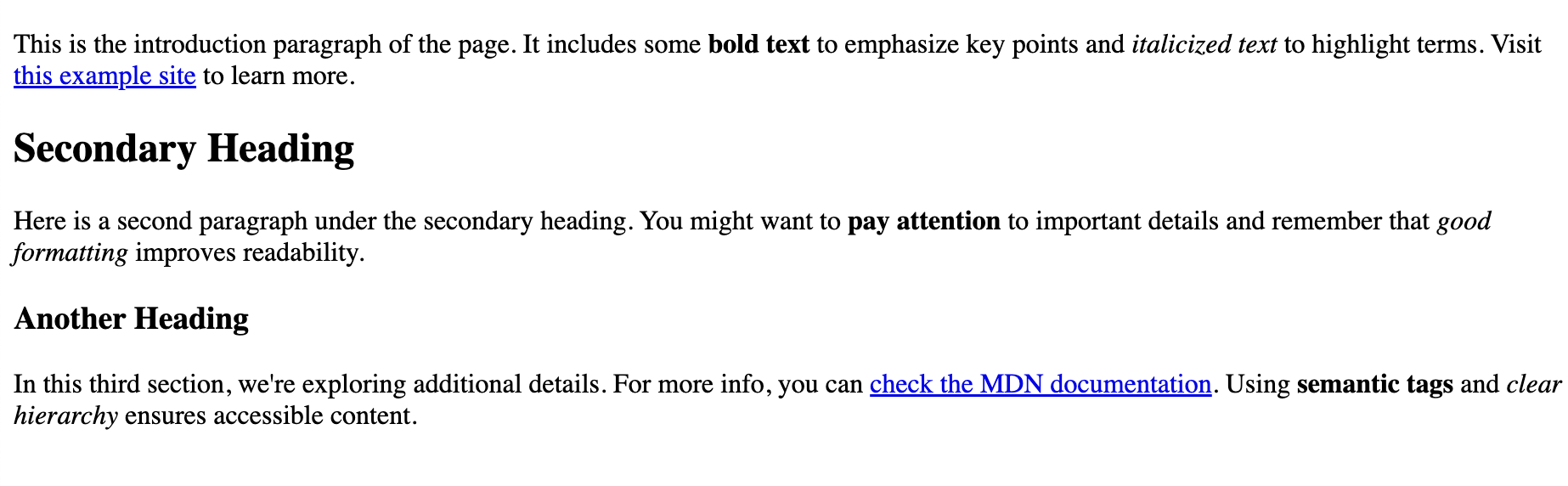
For this page, we would mark
- headings
- bold and italic text
- paragraphs
- links
Below is the HTML file that generates the above page in a browser. Take a quick look and you can see how the markup - html tags - create the structure of the page.
<!DOCTYPE html>
<html lang="en">
<head>
  <meta charset="UTF-8">
  <meta name="viewport" content="width=device-width, initial-scale=1.0">
  <title>starter webpage</title>
</head>
<body>

  <h1>My Most Important Heading</h1>
  <p>This is the introduction paragraph of the page. It includes some <b>bold text</b>
    to emphasize key points and <i>italicized text</i> to highlight terms. Visit
    <a href="https://example.com" target="_blank">this example site</a> to learn more.</p>

  <h2>Secondary Heading</h2>
  <p>Here is a second paragraph under the secondary heading. You might want to
    <b>pay attention</b> to important details and remember that <i>good formatting</i>
    improves readability.</p>

  <h3>Another Heading</h3>
  <p>In this third section, we're exploring additional details. For more info, you can
    <a href="https://developer.mozilla.org" target="_blank">check the MDN documentation</a>.
    Using <b>semantic tags</b> and <i>clear hierarchy</i> ensures accessible content.</p>


</body>
</html>