Structure of an HTML page
There are required elements for every HTML page. We refer to these required elements as the boilerplate.
HTML 5

By 2009, the W3C adopted what is the HTML5 standard. This was a major step forward for several reasons:
-
specifies unambiguously how browsers should deal with invalid markup.
-
provides an open, nonproprietary programming framework (via JavaScript) for creating rich web applications.
-
is backward compatible with the existing web.
The boilerplate for an HTML5 page is:
<!DOCTYPE html>
<html lang="en">
<head>
    <title>Document</title>
</head>
<body>

</body>
</html>
Note that only the DOCTYPE is outside the <html/> tags. Within the <html/> tags are two sections: <head> and <body>.
<head> contains information for the browser that is not displayed in the browser window. <body> section is for the content for the page.
Modify the code below and see the live browser output:
< head /> components
<title /> tag
- Important role in search engine optimization (SEO)
- While each search engine uses different algorithms for determining a page’s rank, the title provides a key role in determining how a page appears in searches.
- Use key terms that the site should appear in searches for.
- The terms should appear in the document’s content.
meta tags
Meta tags provide optional information. For example, by entering the term web documentation in a Google search, reveals the snippet included with the top hit.
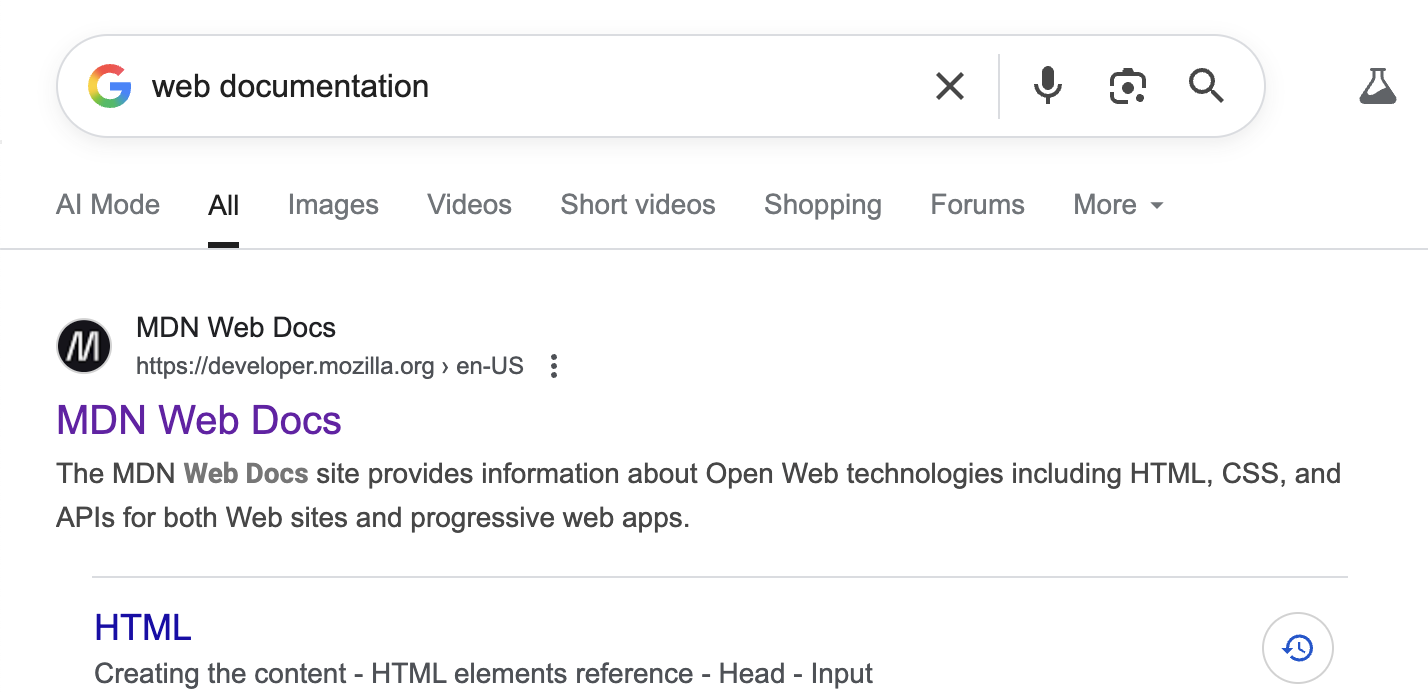
Visit the MDN Web Docs site and use Developer Tools to view the site's meta data.
Look through the meta data to discover Where Google obtained the snippet, extra text to give context, that it returned with the top hit for web documentation.
Example meta data included in the head of MDN web docs:
<!DOCTYPE html>
<html lang="en">
<head>
    <title>Document</title>
</head>
<body>

</body>
</html>
For more information on meta tags, check W3Schools meta tags