Group HTML Elements
Frequently, we want to group multiple HTML elements so that we can treat them as a section. For example, we may want to put the company logo, a heading and a background image together to for a header for the page. The same for a column or a footer. The most common way to group elements is with <div> </div> tags.
Div
<div>
 	<h1>My title</h1>
    <img src="images/logo.png" alt="our logo">
	<p>My description</p>
</div>
<div>
    <div>
        <img src="images/pic1.jpg" alt="a pic">
        <p>Description of stuff ...</p>
    </div>
    <div>
     <p>Our services include:</p>
        <ul>
          <li>consulting</li>
          <li>maintenance</li>
          <li>installation</li>
        </ul>
    </div>
</div>
<div>is a container element, used to group elements on the page<div> </div>elements have no intrinsic presentation or semantic value<div> </div>tags may be nested<div> </div>elements are block elements, so they consume the entire width and the next element will start on a new line.
Span
<span> </span> tags, like divs, wrap or group elements. Unlike divs, <span> </span> tags are inline containers. Span allows you to apply specific styles or behaviors to a portion of text or other elements without affecting the surrounding content or creating new lines. <span> tags are a way to wrap content to make changes without changint the layout.
<p>
  This sentence has a random <span style="color: blue;">blue </span>
  word in the middle of the sentence.
</p>

Semantic Tags
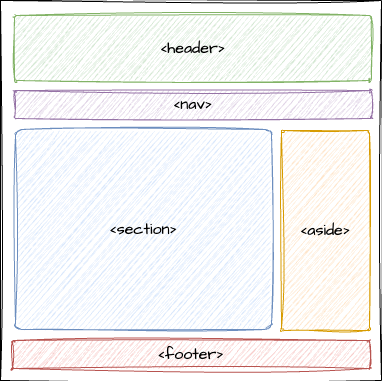
In response to numerous sets of nested <div> </div> tags, HTML5 includes semantic tags. A semantic element describes its meaning to the browser and the developer, improving the readability and accessibility of HTML5 pages.
- semantic - related to meaning, describe the purpose and the type of content they contain.
- semantic tags do not apply any special presentation giving them great flexibility.
<article> </article>and<section> </section>, for instance, can be used many ways.
Examples of non semantic and semantic tags:
<!-- div and span tell us nothing about the meaning -->
<div>, <span>

<!-- Semantic tags clearly describe the meaning -->
<header>, <footer>, <nav>
<article>, <section>, <aside>
<figure>, <figcaption>