Box Model
The CSS box model is how the browser renders the design and layout of the page. The CSS box model is essentially a box that wraps around every HTML element. It consists of:
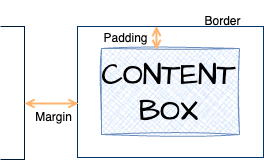
- content - contains the "real" content of the element, such as text, and images
- padding - clears an area around the content.
- border - a border that goes around the padding and content
- margin - clears an area outside the border.
Shorthand
When specifying properties of the box model, you can supply one parameter and it is applied to all four sides. However, if you want different values for a side or top and bottom, you can supply multiple parameters to any box model property.
/* 10 -pixel padding on all four sides */
padding: 10px

/* top & bottom border 5px; no left & right border */
border-width: 5px 0

/* set each, starting with top, right, bottom, left */
margin: 5px 1px 0 2px
Height and Width
/* height of an element; can have values in
 pixels, px, percentages % etc. */
div {
height: 200px;
}

/* follows same units and values as height */
div {
width: 100%;
}

/* limits the maximum width of an element,
   allowing it to scale down if necessary.   */
div {
max-width: 500px;
}
Display Properties
Along with box model properties, each HTML element has display properties.
Block
Elements with display property block cannot reside on the same line but you can adjust the width of the element.
- Paragraphs (
<p>) - Headers (
<h1>through<h6>) - Divisions (
<div>) - Lists and list items (
<ol>,<ul>, and<li>) - Forms (
<form>)
all have display property block by default.
Inline
Elements with display property inline reside on the same line but you cannot change the width. Elements with display property inline include:
- Spans (
<span>) - Text Decoration (
<b>,<em>,<strong>) - Anchors (
<a>)
Inline-block
What if you need to change the width of an inline element? The inline-block property allows this. Elements with display property inline-block
- Can change the width
- Can reside on the same line
- Images(
<img>) have these properties
None
Elements with display property none are not displayed. This is often used to turn off a default style like the underline on links. If you don't want the default underline on links:
a text-decoration: none;