Data Types
JavaScript types fall in two categories: primitive types and object types.
Primitive variables contain the value of the primitive directly within memory.
In contrast, object variables contain a reference or pointer to the block of memory associated with the content of the object. Reference types in JavaScript include arrays, objects and functions.
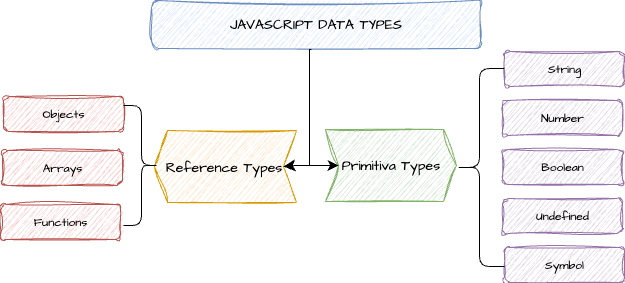
Primitive types
- Number
- String
- Boolean
- null
- undefined
- Symbol (new in ES6)
To declare a variable in JavaScript, use either the var, const, or let keywords. Constants are declared with const.
let myVar; // myVar is undefined
let counter = 10;
let name = "John Doe";
let isLoggedIn = false;
let init = null;
const id = uniqueId;
Reference types
In JavaScript, reference types - objects - are values in memory referenced by an identifier. Objects represent a collection of properties, each equivalent to a key-value pair. Functions and arrays are objects in JavaScript.
Variable scope
Scope is variable "visibility"; The location where a variable is defined dictates where we have access to that variable. Variables are declared with let or var:
- Variables declared by var keyword are scoped to the immediate function body (hence the function scope)
- let variables are scoped to the immediate enclosing block denoted by
{ }(hence the block scope).
function run() {
  var foo = "Foo";
  let bar = "Bar";

  console.log(foo, bar); // Foo Bar

  {
    var woo = "Whooo"
    let hoo = "Hooo";
    console.log(woo, hoo); // Whooo Hooo
  }

  console.log(woo); // Whooo
  console.log(hoo); // ReferenceError
}

run(); // ReferenceError: hoo is not defined
In the above example, the console.log on line 14 fails because the variable declared with let is scoped to the block - lines 7 to 11.
Dynamic typing
When you declare a variable in JavaScript, you do not specify its type. Instead, the JavaScript engine assigns a type based on the value it holds at any given moment.
For example:
    let myVariable;       // type is undefined
    myVariable = 10;      // myVariable is a number
    myVariable = "Hello"; // myVariable is now a string
    myVariable = true;    // myVariable is now a boolean
- Variable Type Can Change - The same variable can hold values of different data types throughout the program's execution. As shown in the example above,
myVariablecan dynamically change its type from a number to a string and then to a boolean. - No Explicit Type Declarations - You do not need to explicitly declare the data type of a variable when you create it. This simplifies writing JavaScript, especially for beginners.
- Runtime Type Checking - Type checks occur during the execution of the program. If operations are attempted on incompatible types, the error is only discovered when the code is run, potentially leading to runtime errors. In contrast, statically typed languages (like Java, C++, or TypeScript) require you to explicitly declare the type of a variable at the time of its declaration, and that type cannot change during runtime.
Static typing of variables, function parameters and return values is enforced with TypeScript. This prevents many common runtime errors that occur in dynamically typed JavaScript.
Destructuring assignment
Newer JavaScript offers destructuring assignment where one or more values are extracted, destructured, from the value on the right and stored into the variables named on the left.
Destructuring is commonly used in :
- initialization of variables,
- assignment expressions
- parameters to a function.
const person = {
    name: "John",
    age: 30,
    city: "New York"
};

// Destructuring the person object into separate variables
let { name, age, city } = person;
console.log(`Name: ${name}, Age: ${age}, City: ${city}`);

let [x, y] = [1, 2];  // same as let x=1, y=2
[x,y] = [x+1, y+1];  // same as x = x+1, y=y+1

[x, y] = [y, x]; //swap two variables x and y without using a temporary variable
console.log(`After swapping: x = ${x}, y = ${y}`);
rest (...) operator
To collect all unused or remaining values into a single variable when destructuring an array, use three dots (...) before the last variable on the left-hand side:
let [x, ...y] = [1,2,3,4]; // y == [2,3,4]
let [first, ...rest] = "Hello";  // first == "H"; rest == ["e", "l", "l", "o"]