Asynchronous JavaScript
Asynchronous programming:
- enables your program to start a potentially long-running task while . . .
- responding to other events, without . . .
- waiting until the task has finished
Once that task has finished, your program is presented with the result.
Why is asynchronous programming important in web programming?
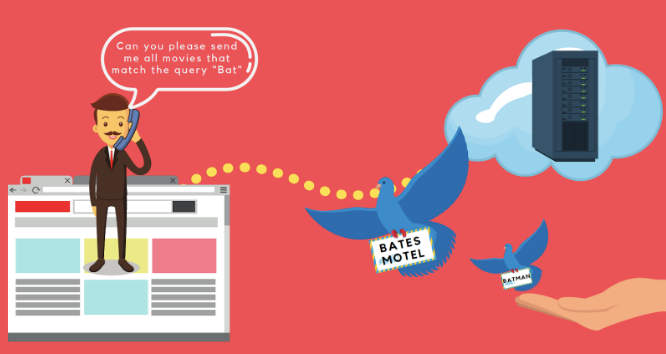
JavaScript in the browser runs on a single thread (the call stack). If a task takes too long, the page would freeze and users couldn’t click, scroll, or type. Asynchronous code lets the browser start a long task and then come back to it later, without blocking everything else.
Potentially long-running tasks include:
-
Network requests: waiting for an API response (could be hundreds of ms or several seconds).
-
Timers:
setTimeoutandsetInterval. -
User input events: typing, scrolling.
-
I/O operations: reading files, accessing databases (on the server side).
task example
fetch("/api/movies")
  .then(res => res.json())
  .then(data => console.log(data));
Without async behavior, the whole page would freeze until the server responds - which could take some time.
setTimeout()
setTimeout() is simple asynchronous operation for when you want to run some
code after a certain amount of time has elapsed. The first argument
to setTimeout() is a
function and the second is a time interval in milliseconds.
This example executes checkForUpdates() after 60 seconds have elapsed.
setTimeout(checkForUpdates, 60000);
async and the web
Why are asynchronous programming methods important to web programming?
Performance: async code keeps websites responsive.
Scalability: async servers (like Node.js) handle many users efficiently.
User experience: async programming enables progress spinners, real-time updates, and background work without freezing the UI.
Event handlers, addEventListener(), are a form of asynchronous programming.
You provide a function (the event handler) that will be called, not right away, but whenever the event happens.

Jack goes to the coffee shop and orders. (Main thread)
Jack: Hi. Please can I have a coffee? (First asynchronous task)
First Attendant: For sure. Do you want something else?
Jack: A piece of cake while waiting for the coffee to be ready. (Second asynchronous task)
First Attendant: For sure. ( Launch the preparation of the coffee )
First Attendant: Anything else?
Jack: No.
First Attendant: 5 dollars, please.
Jack: Pay the money and take a seat.
First Attendant: Start serving the next customer.
Jack: Start checking Twitter while waiting.
Second Attendant: Here's your cake. (Second asynchronous task call returns)
Jack: Thanks
First attendant: Here's your coffee. (First asynchronous task call returns)
Jack: Hey, thanks! Take his stuff and leave.
JavaScript asynchronous runtime
The JavaScript runtime consists of several key components:
- JavaScript Engine
- Call Stack
- Memory Heap
- Web APIs
- Task Queue (Callback queue)
- Microtask Queue
- Event loop
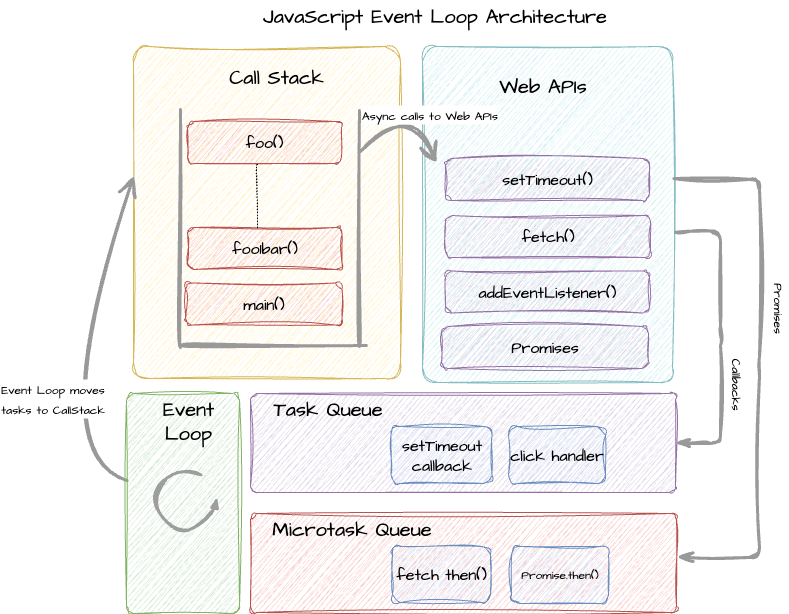
Asynchronous programming on the web is implemented through the cooperation of these components:
- call stack
- web APIs
- event loop
Call Stack

The call stack is the mechanism the JavaScript engine uses to keep track of the function currently being executed. The call stack is how JavaScript “knows” what function is currently being run and what functions are called from within that function, etc.
It follows a LIFO - Last thing in - First thing out order. The last function that gets called is the first one to finish and be removed.
JavaScript has only one call stack - it's single threaded - which means it can execute one task at a time.
The call stack manages execution contexts. When a function runs:
- It is pushed onto the stack.
- It executes.
- It is popped off when complete.
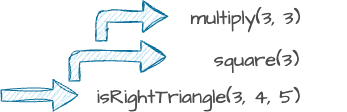
Consider the example below where isRightTriangle() calls square() which calls multiply(). square() doesn't return until multiply() completes and is popped off the stack. isRightTriangle() returns when calls to square() have completed.
const multiply = (x, y) => x * y;
const square = x => multiply(x, x);
const isRightTriangle = (a, b, c) => (square(a) + square(b) === square(c))
isRightTriangle(3, 4, 5);
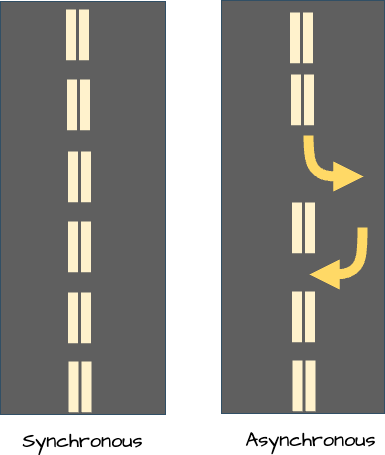
For synchronous code, this happens in strict top-to-bottom order. The problem arises when we introduce long-running tasks, such as:
- Heavy computations
- Network requests
- Timers
- User input
If these ran directly on the call stack, they would block the entire program, freezing the UI and preventing any other code from running.
web APIs
To solve this, browsers provide Web APIs such as:
- setTimeout
- fetch
- DOM APIs
- Geolocation
- Event listeners
When JavaScript calls one of these APIs:
- The API call is briefly added to the call stack.
- It registers a callback.
- The actual long-running task is offloaded to the browser.
- The call stack becomes free again.
The asynchronous work happens outside the call stack , so the program remains responsive. Then don't block execution on JavaScript's single thread.
event loop
The event loop continuously monitors the system and performs one simple but crucial task:
If the call stack is empty, move the next task from a queue to the call stack.
More precisely:
- Check if the call stack is empty.
- If empty, check the microtask queue first.
- If microtasks exist, execute all of them.
- If microtasks are empty, take one task from the task queue.
- After each task, re-check the microtask queue.
This process repeats continuously.
The event loop ensures:
- Asynchronous callbacks do not interrupt running code.
- Execution remains predictable.
- The program remains responsive.
The event loop has three essential components: the call stack, the task queue, and the microtask queue. The call stack stores the currently executing function. The task queue stores tasks that are waiting to be executed.
setTimeout and the Task Queue
With setTimeout, it is important to understand:
- The delay specifies when the callback moves to the task queue, not when it executes.
- Execution only occurs when the call stack is empty.
So if the call stack is busy, the callback must wait—even if its delay has already expired.
The Microtask Queue (Promises)
Promises and certain APIs use the microtask queue, which has higher priority than the task queue.
Microtasks include:
- .then()
- .catch()
- .finally()
When a promise resolves:
- Its handler is placed in the microtask queue.
- The event loop waits for the call stack to empty.
- It executes all microtasks before touching the task queue.
This priority explains why promise handlers often run before setTimeout callbacks—even if the timeout delay is 0.
The call stack executes one task at a time. Web APIs allow asynchronous work to happen outside the call stack. Callback-based async results go to the task queue. Promise-based async results go to the microtask queue.
The event loop coordinates everything by:
- Checking if the stack is empty
- Draining the microtask queue first
- Then processing one task from the task queue
- Repeating the cycle
Here's a good explanation of the event loop.
event loop video presentation
asynchronous methods
Asynchronous methods are used in both the browser and Node.js platforms
for operations that might take a while rather than relying on threads.
Developers can handle operations that take time, in an orderly
and readable way by using three asynchronous programming methods:
callbacks, promises, and async/await:
- Callbacks
- Promises
- Async/Await
Callbacks

One approach to asynchronous programming is to make functions that need to wait for something take an extra argument, a callback function. The asynchronous function starts the process, then the callback function is called when the process finishes.
setTimeout is an example. setTimeout waits a number of milliseconds and then calls a function. In this example, the function inside setTimeout will run after a two second delay (2000 milliseconds).
setTimeout(()=> console.log("Hello"), 2000);
Consider this example. The functions don’t complete in the order called because one of the functions is asynchronous.
function one() {
   console.log("step one");
}
function two() {
   setTimeout(() => console.log("step two"), 2000);
}
function three() {
     console.log("step three");
}
// call in this order
one();
two();
three();
executes in this order:
We can fix this by using callbacks. Callbacks can be useful when you need to arrange for something to happen in a certain order.
function one(call_two) {
   console.log("step one complete.  Now callback");
   call_two(three)  }

function two(call_three) {
   console.log("step two");
   call_three();
}
function three() {
   console.log("step three");
}
// call one and pass two
one(two);
We achieve the correct order of execution by passing the subsequent function as a callback.
Here's a more practical example. Suppose that you need to develop a script that downloads a picture from a remote server and process it after the download completes:
function download(url) {
   // ...
}

function process(picture) {
   // ...
}
// call in this order
download(url);
process(picture);
However, downloading a picture from a remote server takes time and would be an asynchronous function. The process() function executes before the download() function completes. Not what you wanted. The execution order isn’t ordered as called or intended.
To resolve this issue, you can pass the process() function to the download() function and execute the process() function when the download completes. Now, it works as expected.
function download(url, callback) {

     setTimeout(() => {
      console.log(`Downloading ${url} ...`);
      callback(url);
  }, 1000);
}

let url = 'https://www.xyz.net/pic.jpg';

download(url, (picture) => {
  console.log(`Processing ${picture}`);
});
Yields results as intended. Image is downloaded then processed:
handling errors
The download() function assumes that everything works fine and does not consider any exceptions. But what about handling errors? Typically, we need to handle a success case and a failure case, particularly with potentially long-running tasks.
nested callbacks
How do you download three pictures and process them sequentially? A typical approach is to call the download() function inside the callback function.
This strategy does not scale as the complexity grows….
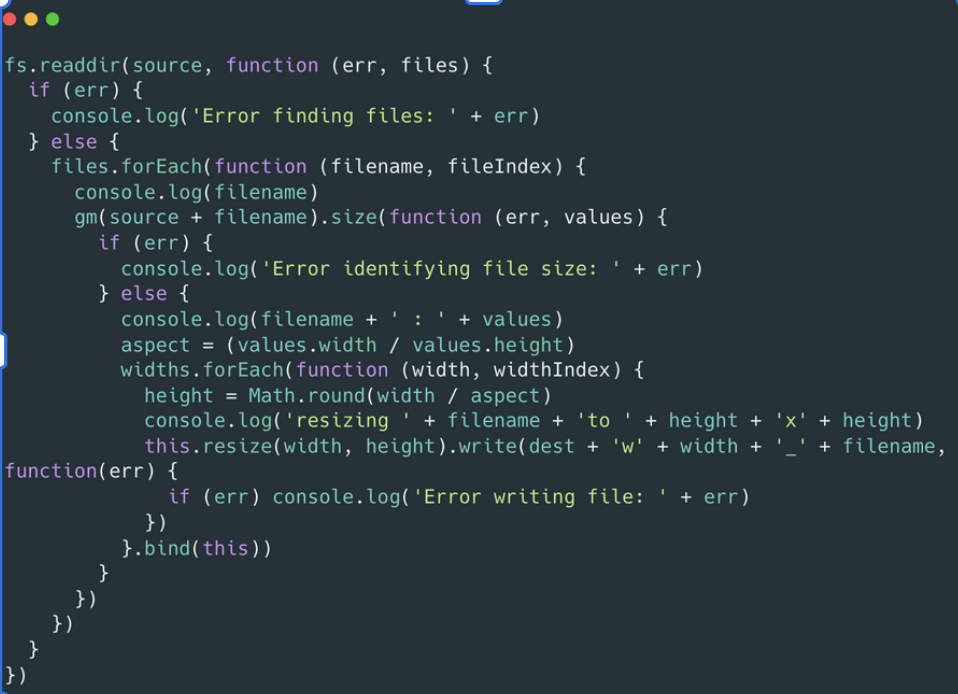
A key problem with the callback coding approach are the hierarchies of nested callbacks which can quickly become quite complicated to understand and debug. This is a problem with asynchronous coding, in which some code can’t be executed until some other callback occurs first.
With complex chaining of events, multiple nested callbacks (callback h-----!) are needed which becomes very difficult to follow and maintain.
To avoid callback h___! you use promises or async/await functions.
Promises

Handling an event that may happen some time in the future is a difficult aspect of asynchronous programming. What if, instead of just passing a function and waiting on it will be called some time in the future, you got a return object that represents the future event? This is what class Promise does.
What is a promise?
A promise is an object that represents the eventual result of an asynchronous operation. It acts as a placeholder for a value that will be available later — either a successful result or an error.
With promises, an asynchronous method can return something immediately, in contrast to
passing a callback and hoping that the async function will call it some time in the future.
Something is a returned promise object that you can attach methods to. To get
the result of a promise, you can use its then method. This registers a callback function
to be called when the promise resolves and produces a value.
Promises provide a cleaner interface for chainable asynchronous tasks than nesting callbacks.
states of a promise
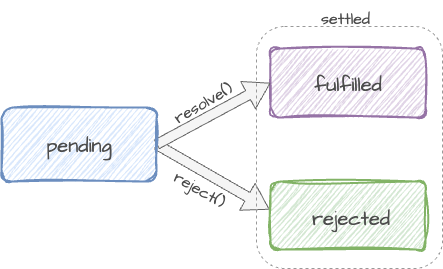
Consider this analogy. Imagine you are a kid. Your dad promises you that he will buy you a new toy next week. That is a promise. A promise has 3 states:
- Pending: You don’t know if you will get the toy
- Fulfilled: Dad is happy and he will get you a toy
- Rejected: Your dad is not happy, he withholds the toy
Imagine that you’re a top singer, and fans ask day and night for your upcoming song.
To get some relief, you promise to send it to them when it’s published. You give your fans a list. They can fill in their email addresses, so that when the song becomes available, all subscribed parties instantly receive it. And even if something goes very wrong, say, a fire in the studio, so that you can’t publish the song, they will still be notified.
Everyone is happy: you, because the people don’t crowd you anymore, and fans, because they won’t miss the song.
Programming analogy:
-
Producing code does something that takes time. For example, loading data over a network - the singer
-
Consuming code wants the result of the producing code once it’s ready. Many functions may need that result - the fans
-
A promise is a special JavaScript object that links the producing code and the consuming code together. In terms of the singer / fan analogy this is the subscription list. The producing code takes whatever time it needs to produce the promised result, and the promise makes that result available to all of the subscribed code when it’s ready.
creating a promise
To create a promise, you can use a Promise constructor. The constructor
expects a function as an argument, which it immediately calls, passing it two parameters:
a resolve() function and a reject() function. These are the handlers for success and
failure outcomes. resolve and reject are callbacks provided by JavaScript itself.
let promise = new Promise((resolve, reject) => {
      // the producing code - the singer
}));
the executor
The function passed to the constructor is called the executor. The executor runs automatically. It contains the code - the real work that the asyn function is to accomplish - which eventually produces the result. In terms of the analogy above: the executor is the singer.
When the executor obtains the result, be it sooner or later, it should call one of these callbacks:
resolve(value)— if the job is finished successfully, with result value.reject(error)— if an error has occurred, error is the error object.
resolve and reject
The resolve function is called when the asynchronous task successfully completes its work. We pass the fulfilled value to the resolve function and say that the promise has been resolved.
When the asynchronous task fails to execute its assigned task, the reject function is called, passing the error message as the first argument. Now we say that the promise has been rejected.
const p = new Promise((resolve, reject) => {
  setTimeout(() => {
    if (condition) {
      resolve(‘data here’);
    }
    reject(‘Error message’);
  }, 1000)
});
In this example, the promise state is initially pending. ( p is immediately pending. )
The executor performs the work. When the work is finished, resolve is called on success or reject() if
there was an error. It passes the result - the data payload - to resolve on success and the error
to reject if the executor code fails.
resolve and reject expect only one argument (or none) and ignore additional arguments.
Reject with Error objects
On error, the executor should call reject(). reject() can be called with any type of
argument (just like resolve), but Error objects are recommended.
::info role of Promise A promise acts as the bridge between:
- the executor - the code that performa the asynchronous work (the singer in the singer/fan analogy), and
- the consumers - the functions that wait for and use the result (the fans).
When the executor finishes, it can end in one of two states:
- fulfilled (resolved) with a result, or
- rejected with an error. :::
Handling a Promise
To consume a Promise, you subscribe to it using .then() and .catch().
Using .then
The .then() method is used to handle the successful resolution of a Promise.
promise.then(result => {
  // use the result
});
.then()takes a callback function as its first argument.- This functions runs after the Promise is resolved.
- The resolved value - the payload - of the Promise is passed into the callback as an argument.
- The singer creates (executor)
- Fans subscribe (.then() )
- When the song is ready, the fans receive the results
We see in the example below, fetchMessage() is an asynchronous task that
-
returns a promise immediately ( pending ); we see the output of the
console.log()on line 10 is 1 [object Promise] ( or Promise pending in the browser developer tools ). -
promise.then(...) attaches a fulfillment handler that expects the resolved value as message.
-
After ~1s, resolve("Hello from the async world!") fulfills the promise.
-
The
.thenhandler is moved to the task queue and then runs, logging the message.
function fetchMessage() {
  return new Promise((resolve, reject) => {
    setTimeout(() => {
      resolve("Hello from the async world!");
    }, 1000);
  });
}

const promise = fetchMessage(); // <- returns a Promise object immediately
console.log(promise); // Promise { <pending> }

promise.then(message => {
  console.log(message);
});
.catch()
In the case of a rejection, we have .catch(error).
function fetchMessage(shouldFail = false) {
  return new Promise((resolve, reject) => {
    setTimeout(() => {
      if (shouldFail) {
        reject(new Error("Network error"));
      } else {
        resolve("Hello from the async world!");
      }
    }, 1000);
  });
}

fetchMessage()
  .then(message => {
    console.log("SUCCESS:", message);
  })
  .catch(err => {
    console.error("ERROR:", err.message);
  });
.finally()
finally() runs always, when the promise is settled: be it resolve or reject. The idea of finally is to set up a handler for performing cleanup/finalizing after the previous operations are complete. A finally handler has no arguments. In finally we don’t know whether the promise is successful or not. The finally handler has no arguments, and the promise outcome is handled by the next handler.
function fetchMessage(shouldFail = false) {
  return new Promise((resolve, reject) => {
    setTimeout(() => {
      if (shouldFail) {
        reject(new Error("Network error"));
      } else {
        resolve("Hello from the async world!");
      }
    }, 1000);
  });
}

fetchMessage()
  .then(message => {
    console.log("SUCCESS:", message);
  })
  .catch(err => {
    console.error("ERROR:", err.message);
  })
  .finally(() => {
    console.log("Finished (success case)"); // runs either way
  });
cloud transfer example
Suppose we have several asynchronous events we want to "chain" together. Consider this clould transfer example:
- transferToCloud() - transfer the image to cloud storage.
- .then() - Use a machine learning service to extract some tags.
- .then() - Create a compressed version of the uploaded image.
The coordinator (transferToCloud()) can chain the promises together, eliminating nested callbacks.
function transferToCloud(filename) {
  return new Promise( (resolve, reject) => {
    let cloudURL ="http://.../makebelieve.jpg";
    if ( existsOnServer(filename) ) {
      performTransfer(filename, cloudURL);
      resolve(cloudURL);
    } else {
      reject( new Error('filename does not exist'));
    }
  });
}
transferToCloud(file)
.then( url => extractTags(url) )
.then( url => compressImage(url) )
.catch( err => logThisError(err) );
order events example
Suppose that you need to perform three asynchronous operations in the following sequence:
- Select a user from the database.
- Get services of the user from an API.
- Calculate the service cost based on the services from the server.
The functions in the example represent the three tasks: getUser, getServices, getServiceCost.
Note that the
setTimeout()function is used to simulate the asynchronous operation.
function getUser(userId) {
  return new Promise((resolve) => {
    console.log('Get user from the database.');
    setTimeout(() => {
      resolve({ userId, username: 'john' });
    }, 1000);
  });
}

function getServices(user) {
  return new Promise((resolve) => {
    console.log(`Get services of ${user.username} from the API.`);
    setTimeout(() => resolve(['Email', 'VPN', 'CDN']), 2000);
  });
}

function getServiceCost(services) {
  return new Promise((resolve) => {
    console.log(`Calculate service costs of ${services}.`);
    setTimeout(() => resolve(services.length * 100), 3000);
  });
}
You can chain the promises:
getUser(100)
  .then(getServices)
  .then(getServiceCost)
  .then(total => console.log('Total cost:', total))
  .catch(err => console.error('Error:', err));
This works to order the events.
Async and Await

Async/await is an alternative way of writing promises that makes reading and writing async code easier. Async / await is syntactic sugar for promises. We can use async/await to order asynchronous events with code that looks more like synchronous code.
If a function returns a Promise, you can place the await
keyword in front of the function call. The await will wait for the Promise
returned from the function to settle. The await keyword can be used only
inside the async functions. The async keyword allows you to define a function
that handles asynchronous operations. To define an async function, you
place the async keyword in front of the function definition.
We could use async / await to order the events in the example above.
- When async is placed before a function, it always returns a promise.
- If the function returns a value, the promise will be resolved with that value.
- If the function throws an exception, the promise will be rejected.
async function showServiceCost() {
    let user = await getUser(100);
    let services = await getServices(user);
    let cost = await getServiceCost(services);
    console.log(`The service cost is ${cost}`);
}

showServiceCost();
You can handle errors with try / catch:
async function showServiceCost() {
    try {
       let user = await getUser(100);
       let services = await getServices(user);
       let cost = await getServiceCost(services);
       console.log(`The service cost is ${cost}`);
    } catch(error) {
        console.log("Error")
       console.log(error);
    }
}

 showServiceCost();
uses of async / await
- async and await must be used together
- exceptions: JS modules and chrome dev tools
- async/await only affects Promise receiver. The creation of Promises is the same.
- You can await any function that returns a Promise
- Any function can be converted to async
- All async functions return a Promise
- The await keyword provides the ability to treat asynchronous functions that return Promise objects as if they were synchronous.
let obj = await fetch(url);Now, obj will contain whatever the resolve() function of the fetch() returns.