Web APIs - endpoints
With a model to describe what our data will look like,
we can implement the server endpoints that will
respond to client requests.
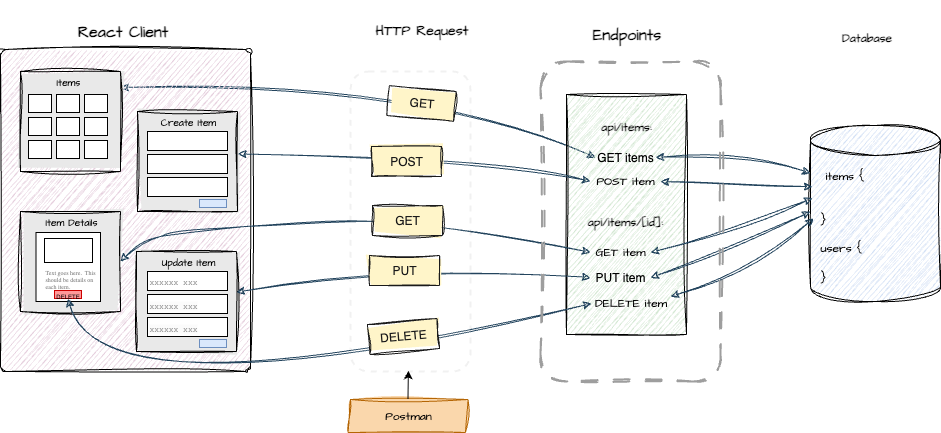
Creating endpoints in App Router
Implementing API endpoints in Next.js App Router involves creating route handlers within the app directory.
To implement endpoints, we will use Nextjs App Router's API routes.
Implementing endpoints in app router
- Create a folder for your API route:
Inside your
appdirectory, create anapifolder. This folder will become part of you API endpoint path.
For example, to create an endpoint at /api/items,
you would have app/api/items.
app/
  api/
    items/
      route.ts
-
Create a route.ts file: Inside the final folder of your API route (e.g., app/api/items), create a file named
route.ts(or route.js if not using TypeScript). -
Define HTTP method handlers: Within route.ts, export asynchronous functions corresponding to the HTTP methods you want to handle (e.g., GET, POST, PUT, DELETE).
When we refer to the path on the server that handles a request:
ie.: /api/items (where the server listens)
together with the action, HTTP method, this is an endpoint. Each endpoint performs a specific action (e.g., create, read, update, delete).
Server routes vs endpoints
| Term | Focus | Example |
|---|---|---|
| Server Route | The URL path on the server that maps to a file or folder in the /app/api directory. | /api/items |
| Endpoint | A specific HTTP method applied to a route, representing an actionable operation (like fetching, creating, or deleting data). | POST /api/items |
In Next.js App Router, a server route defines where requests go (the path), while an endpoint defines what action occurs at that route. For example:
-
/api/items is the route.
-
GET /api/items retrieves all items.
-
POST /api/items creates a new item.
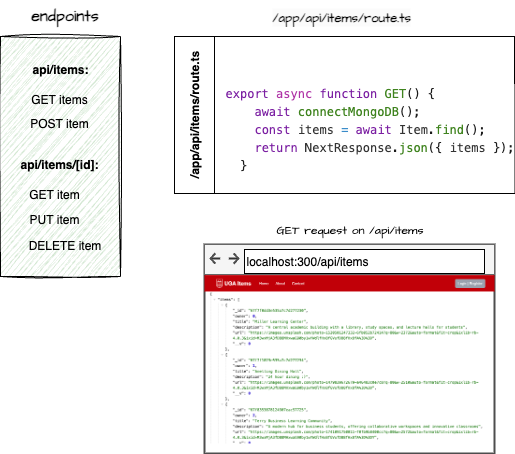
function definitions
Example route file structure and function definitions for endpoints /api/items.
import connectMongoDB from "../../../../config/mongodb";
import Item from "@/models/itemSchema";
import { NextResponse } from "next/server";
import { NextRequest } from "next/server";

export async function GET(request: NextRequest) {
    // Handle GET requests
}

export async function POST(request: NextRequest) {
    // Handle POST requests
}
The POST and GET functions act as HTTP method handlers; they handle requests based on the type of HTTP method used by the client. Since they involve asynchronous database operations, they are async so the response can be awaited.
function naming
In the route.ts files, we will create functions that match the HTTP method type: e.g. POST, GET, DELETE, PUT because Nextjs uses these specific names to map each function to its corresponding HTTP request type.
dynamic route handlers
To create endpoints that handle dynamic routes - ie. to update a specific item, delete an item, or read an item.
For these, we don't know the specific route because the item identifiers are not known in advance,
but rather can be added dynamically and assigned an identifier. App Router with nextjs
handles this with dynamic routes, denoted by [ ] around the identifier.
For example, to handle routes to specific items, we'll create a [id] folder
in api/items. Then, create a route.ts file in [id].
Instructions for implementing create, read, update and delete operations for the example items.