Authorization with NextAuth
Authorization is the process of verifying what the user is allowed to do. In this tutorial, we'll implement authorization with JSON web tokens - JWTs. We'll use the user information in the token to conditionally render a navbar.
We'll implement route protection with
proxy.ts.
This tutorial builds on the 'Credential login' tutorial -- authentication, signup, and login must already be working. The auth setup, signup and login forms are complete and JWT sessions are enabled. Now we will use the session token to allow only authenticated users to add (create-item), edit (update-item) and delete (delete-items) items.
We will restrict access so that only authenticated users can:
- create items (
/create-item) - update items (
/update-item) - delete items (
/delete-item)
Session Management
auth() provides tools for accessing session data on both the server and client.
Server Components
const session = await auth();
- returns the current session
session.usercontains user info if logged innullif not authenticated
Client Components
import { useSession } from "next-auth/react";`

const { data: session } = useSession();
session-> user dataundefined-> loadingnull-> not authenticated
Logout
await signOut({ redirectTo: "/" });
- Deletes session cookie
- Ends login session
Route Protection with Proxy
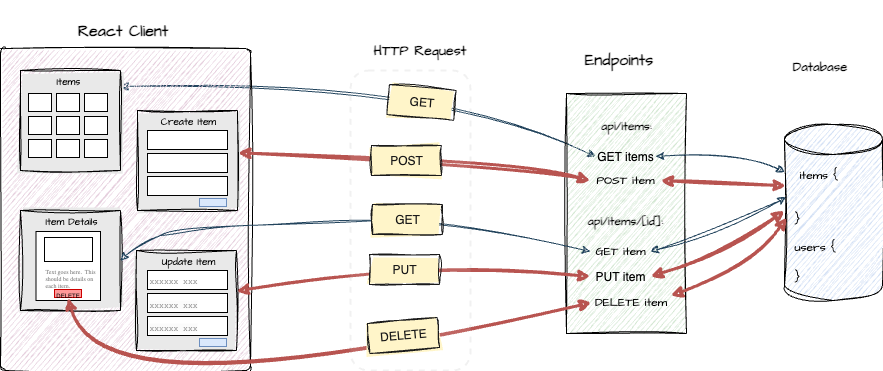
Proxy (formerly middleware) executes between a client's request and the server's response - before a request reaches a route. It allows you to:
- check authentication
- redirect users
Proxy acts as a gatekeeper - it prevents unauthorized users from reaching protected routes.
If a request is authorized, we call next() to continue to the server endpoint. If
not authorized, return with a 403 status and/or redirect to another route.
The middleware.ts file was renamed to proxy.ts with version 16 of Next.js. (released 10/21/25 )
Proxy Setup
We set up proxy by creating a file called
proxy.ts at the project root.
We can implement authorization and protecting routes in proxy.ts.
We can check if the user is authenticated before the
request is forwarded to the server endpoint.
export default auth((request) => {
  const { pathname } = request.nextUrl;
  const isAuthenticated = !!request.auth?.user;

    const publicPaths = ["/", "/show-item", "/show-items", "/api/items"];

    if (!isAuthenticated && !publicPaths.includes(pathname)) {
        return NextResponse.redirect(new URL("/", request.url));
    }

    return NextResponse.next();

};

export const config = {
  matcher: [
    "/create-item/:path*",
    "/update-item/:path*",
    "/delete-item/:path*",
  ],
};
The proxy ensures that only authenticated users can reach certain reoutes.
If the user isn't logged in, they are redirected to the login page. Here's a breakdown:
- A request matches the
matcher. proxy.tsruns before the routeAuth.jsinjects session intorequest.auth- You check if the user is authenticated
- Either:
- redirect ( if not authenticated)
- continue (NextResponse.next())
Matcher
In Next.js, the matcher controls which routes are protected. It acts as a filter, ensuring that the proxy only executes for the matching routes. Other routes are skipped. This allows for targeted proxy behavior, such as authentication checks for certain routes or API requests.
For example:
"/create-item/:path*"
matches:
/create-item/create-item/123/create-item/edit
Session Management
Auth.js provides tools for accessing session data on both the server and client.
Server Components - auth()
const session = await auth();
- returns the current session
session.usercontains user info if logged innullif not authenticated
Client Components - useSession()
import { useSession } from "next-auth/react";

const { data: session } = useSession();
session-> user dataundefineedloadingnull-> not authenticated
The useSession() hook in client components returns an object that contains session data about the authenticated user. user: An object containing information about the user if the user is authenticated. If the session is still loading, it will be undefined. If the session fetch failed or the user is not authenticated, it will be null.
Navbar example
We can use the session data to implement conditional rendering based on authentication status. We'll demonstrate this
in a Navbar component. See the images below:


user from auth
We want to render a personalized welcome message to a user who is authenticated.
We can access the user data in the session returned from auth():
export default async function Navbar() {
  const session = await auth();
  const isLoggedIn = !!session?.user;

  return (
    <nav className="navbar">

        ...
        {isLoggedIn ? (
            <>
              <Link href="#">
                Welcome {session.user.name}
              </Link>

              <LogoutButton />
            </>
        ) : (
            <Link href="/login">
                Login
            </Link>
        )}
        ...
    </nav>
Logout
Well implement the ending of the login session and deleting of the token in <LogoutButton/>.
export function LogoutButton() {

  const handleLogout = async () => {
    await doLogout();
    router.refresh();
  };

  return (
    <button onClick={ handleLogout }>
      Logout
    </button>
  );
}
/login
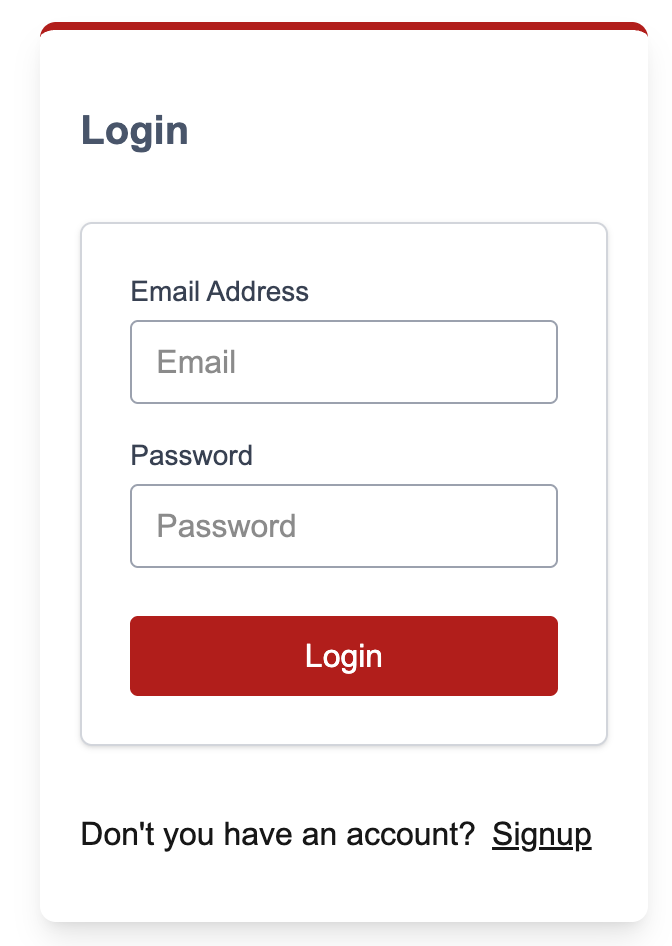
To be able to redirect to the LoginForm component at /login, we'll add a client route for /login.
const LoginPage = () => {
  return (
    <div className="flex flex-col justify-center items-center">
       <LoginForm />
    </div>
  )
}
Be sure to import and export components as necessary.
/signup
We'll provide the option to signup on the login form. Here is the redirect to
/signup in the LoginForm:
   <p>Don't you have an account?
        <Link href="/signup" className="mx-2 underline">Signup</Link>
    </p>
If the signup link is
clicked, we'll redirect to the SignupForm component at /signup. We need to
add a client route for /signup:
const SignupPage = () => {
  return (
    <div className="flex flex-col justify-center items-center">
       <SignupForm />
    </div>
  )
}