Communication on the web
We've learned to build interactive pages with React, but our pages need to communicate with servers - to retrieve and store data, verify login credentials, and integrate with web api's. HTTP requests provide the communication between client and server.
What Are HTTP Requests?
HTTP (Hypertext Transfer Protocol) is the language browsers and servers use to talk to each other. When our React app needs data — such as user info, weather reports, jokes, or database items — it asks the server for that data through an HTTP request. Likewise, when a user submits a form or updates content, your client app sends that information back to the server using an HTTP request.
HTTP is the protocol used to structure requests and responses over the internet.
Whenever we enter a URL in the browser, there is an HTTP request sent to the web server which then sends a response.
HTTP Methods
HTTP has a set of request methods to specify what action is to be performed on a particular resource.
The four methods listed below define the type of action your app is performing on data.
| HTTP Method | CRUD Action | What It Does | Example in a Next.js App |
|---|---|---|---|
| GET | Read | read/retrieve data from the server. | Fetching a list of items, blog posts, or users. |
| POST | Create | Sends new data to the server to be saved or processed. | Submitting a new comment or creating a new user. |
| PUT / PATCH | Update | Modifies existing data on the server. | Editing a profile or updating an event’s details. |
| DELETE | Delete | Removes data from the server. | Deleting a user or item record. |
The HTTP methods listed above define the actions referred to as CRUD operations: create, read, update and delete.
HTTP requests are the bridge between the user interface and your server or database. In other words, they are how your front end communicates with your back end.
View this video for an overview of HTTP requests.
HTTP view in network communication
Wireshark is a popular tool that captures and displays the actual data packets traveling across a network. A quick look in Wireshark shows HTTP GET and POST requests.
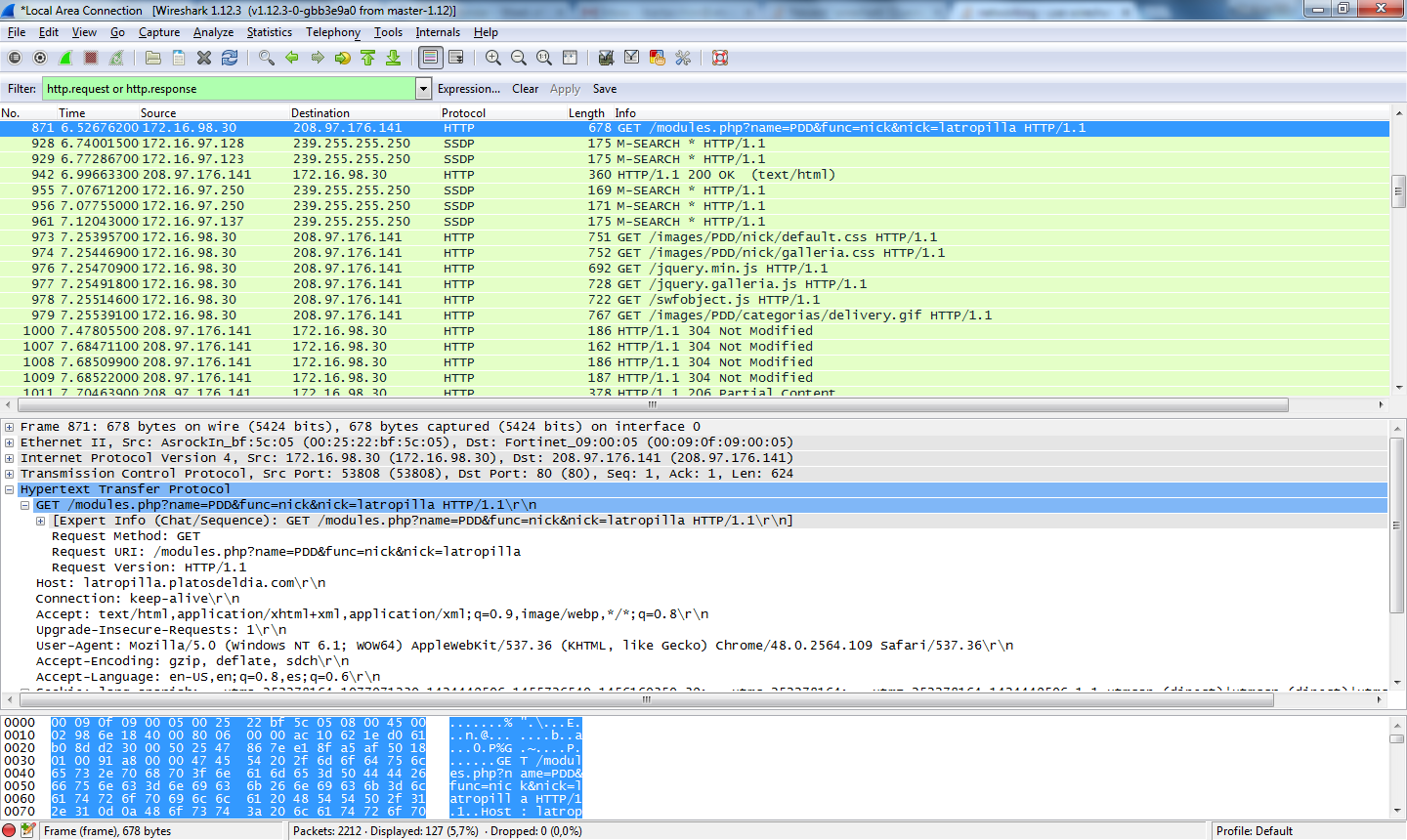
Client to server example
client side
In client components, the fetch() sends an HTTP request to your API routes or
external APIs.
- Client Component Example
'use client';
import { useState, useEffect } from 'react';

export default function Items() {
  const [ugaItems, setUgaItems] = useState([]);
  const [error, setError] = useState<string | null>(null);

  useEffect(() => {
    async function fetchItems() {
      try {
        const response = await fetch('/api/items');

        if (!response.ok) {
          throw new Error(`Request failed with status ${response.status}`);
        }
        const data = await response.json();
        setUgaItems(data.items || []);
      } catch (err: any) {
        console.error('Error fetching items:', err);
        setError(err.message);
      }
    }

    fetchItems();
  }, []);

  if (error) {
    return <p>Error: {error}</p>;
  }

  if (ugaItems.length === 0) {
    return <p>No items found.</p>;
  }

  return (
    <ul>
      {ugaItems.map((item) => (
        <li key={item.id}>{item.name}</li>
      ))}
    </ul>
  );
}
server side
Next.js lets you create API routes right in your project under /app/api/.
Each API route defines what happens when the client sends an HTTP request.
- API Route Example
import { NextResponse } from 'next/server';

export async function GET() {
  try {
    await connectMongoDB();
    const items = await Item.find();
    return NextResponse.json({ items }, { status: 200 })
  } catch (error) {
     console.error('Error fetching items:', error);
      return NextResponse.json(
        { message: 'Failed to fetch items', error: error.message },
        { status: 500 }
      );
  }
}
Method name, GET matches the request method. connectMongoDB connects to the database. find() queries the items in the database. Return
the JSON data and a success status code on successful fetch of items from the database, failure
message and status on failed fetch.
This pairing (client side + server side) shows how HTTP connects the two:
- The component makes a
GETorPOSTrequest. GET is the default. - The API route receives it, interacts with a database, and returns a JSON response.
Common HTTP Status Codes
When your React or Next.js app sends an HTTP request, the server responds with a status code. These codes tell you whether the request succeeded, failed, or needs attention.
| Status Code | Meaning | Common Use |
|---|---|---|
| 200 OK | Request succeeded and the server returned data. | Successful GET or PUT requests. |
| 201 Created | A new resource was created successfully. | Response to a POST that adds a new record. |
| 204 No Content | Request succeeded but there’s no data to return. | After a DELETE or PUT that makes changes only. |
| 400 Bad Request | The request was invalid or missing required data. | Invalid input sent to API. |
| 401 Unauthorized | Authentication required or missing credentials. | Protected routes (login required). |
| 403 Forbidden | Authenticated but not allowed to perform this action. | User lacks permission to modify a resource. |
| 404 Not Found | The requested resource or endpoint doesn’t exist. | Typo or deleted resource. |
| 500 Internal Server Error | The server failed to process the request due to a backend error. | Common in broken routes or DB issues. |
fetch()When using fetch() in your React or Next.js components, always check the response status before trying to use the returned data.
This helps you detect and handle errors gracefully instead of breaking your UI.