fetch() to send http requests
How do we send requests to the server from our client?
We make HTTP requests from our React components.
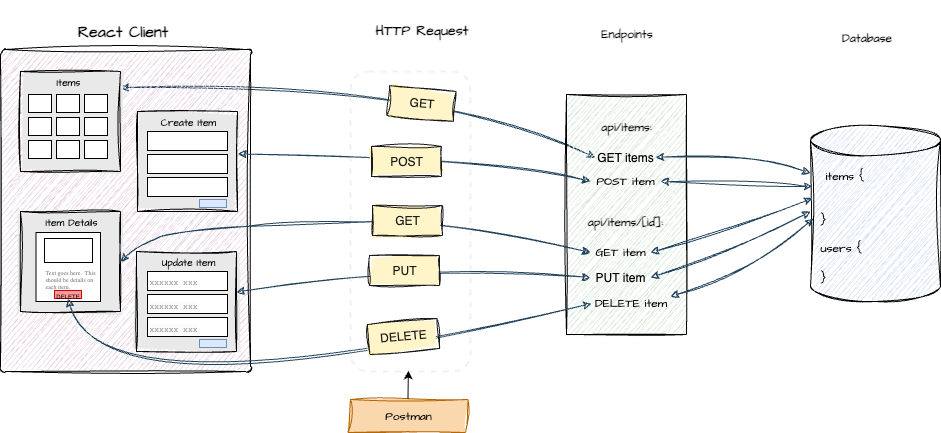
In Next.js, you can send asynchronous HTTP requests using the fetch API or a
library like axios. We'll use the fetch API to send and respond to http requests.
fetch() is the built-in api for making network requests - specifically
HTTP requests such as GET, POST, etc. fetch() is available in both browser-based client applications and
Node.js environments. We use fetch() to request data from public APIs that provide
data such as a “quote of the day” service or a weather service API.
fetch() returns a Promise that, when fulfilled, contains the response
data in .then() or returned with async/await. The response object has several properties:
- response.ok - a boolean value, true if the response status code is between 200–299 (successful).
- response.status - The numeric HTTP status code (like 200, 404, 500).
- response.url - the final URL of the response
- response.json() - parses body as JSON, returns a Promise.
- response.text() - reads the body as plain text.
- response.blob() - reads the body as binary data (e.g., for images).
- response.formData() - reads the body as form data.
Find more information on the fetch response object
We need to determine what requests our application will make. For example, to implement the Create, Read, Update and Delete ( CRUD ) operations on our set of items, we'll make the following requests:
| action | route | http request method |
|---|---|---|
| retrieve list items | / | |
| retrieve a specific item | /[id] | GET |
| add a new item | / | POST |
| update a specific item | /[id] | PUT |
| delete a specific item | /[id] | DELETE |
fetch to retrieve a list
This example uses the fetch API to retrieve the set of items `.
async function Items() {
  const [UGAitems, setItems] = useState<ItemType[]>([]);

  useEffect(() => {
    const fetchItems = async() => {
      const response = await fetch('/api/items');
      if (!response.ok) throw new Error('Network response was not ok');

      const data = await response.json();
      setItems(data.items);
    };

    fetchItems();
  }, []);
  return (
    {UGAitems.map((item) => (
      <Item key={item._id} item={item} />
    ))}
  )
}
The asynchronous fetch call makes a GET request ( GET is the default ) and
returns a Response object on resolve of the promise. data.json() parses the body of Response as JSON. It returns a promise that
resolves to the array of posts. We use map() to create each post item.
Read the next.js documention on fetch to learn more.
fetch to post a new user
This example uses the fetch API to send a new user to the server.
headers specifies that the request body is JSON data. body contains the
actual user data to send in the request. data is converted to a JSON string with
JSON.stringify().
The JSON string is sent to the server in the body of the request.
async function createUser(data: { username:    string; email: string; password: string })
{
  const response = await fetch('/api/users', {
    method: 'POST',
    headers: {
      'Content-Type': 'application/json',
    },
    body: JSON.stringify(data),
  });
  return await response.json();
}
fetch to send an item
This example uses the fetch API to send a new item to the server.
headers specifies that the request body is JSON data. body contains the actual
user data to send in the request. data is converted to a JSON string with
JSON.stringify(). The JSON string is sent to the server in the body of the request.
const onSubmit = async (e: React.FormEvent>) => {
   e.preventDefault();

   try {
     const response = await fetch('/api/items', {
       method: 'POST',
       headers: {
         'Content-Type': 'application/json',
       },
       body: JSON.stringify(item),
     });

     if (!response.ok) {throw new Error('ERROR');}

     setItem({
       owner: 0,
       title: '',
       description: '',
       url: '',
     });

     router.push('/');
   } catch (error) {
     console.error('Error in CreateItem!', error);
   }
 };
fetch to retrieve users
This example uses the fetch API to request the list of users at endpoint /api/users.
The asynchronous fetch call makes a GET request which returns a response object on resolve.
async function getUsers() {
   const response = await fetch('/api/users',
   {
      method: 'GET',
   });
   return await response.json();
}
status code
The response object contains contains the status code:
- 200 - success
- 404 - not found
- 500 - server error
Using the fetch API, the response.ok property is a boolean that indicates
whether the HTTP response was successful. response.ok will be true if the
response status code is 200.
async function getUsers() {
   const response = await fetch('/api/users',
   {
      method: 'GET',
   });

   if (!response.ok) {
      throw new Error('Failed to fetch users');
   }

   return await response.json();
}
fetch to load items on mount
This example uses the fetch API to request the list of items at
endpoint /api/items. The asynchronous fetch call makes a GET request
which returns a response object on resolve. useEffect() ensures this fetch
runs when the component mounts.
export default function ShowItemList() {
const [items, setItems] = useState([]);

useEffect(() => {
   const fetchItems = async () => {
     try {
       const response = await fetch('/api/items');
       if (!response.ok) {
         throw new Error('Network response was not ok');
       }
       const data = await response.json();
        setItems(data.items);
     } catch (error) {
           console.log('Error from ShowItemList:', error);
     }
   };
   fetchItems();
 }, []);
fetch a specific item
This example uses the fetch API to request a specific item at
endpoint /api/items/[id]. The useEffect() hook makes the HTTP request
when the component mounts. This is helpful when we don't have a user event, such as a
button click to trigger the request. The asynchronous fetch call makes a GET request
which returns a response object on resolve.
'use client';

import { useState, useEffect } from 'react';

type Item = {
  title: string;
  description: string;
  published_date: string;
  image: string;
};

export default async function ShowItem({ params }: {params: Promise<{ id: string }>}) {
  const { id } = await params;

  const [item, setItem] = useState<Item>({
    title: '',
    description: '',
    published_date: '',
    image: '',
  });

  useEffect(() => {
    const fetchItem = async () => {
      try {
        const response = await fetch(`/api/items/${id}`);
        if (!response.ok) {
          throw new Error('Network response was not ok');
        }
        const data = await response.json();
        const itemData = data.item;

        setItem({
          title: itemData.title || '',
          description: itemData.description || '',
          published_date: itemData.published_date || '',
          image: itemData.image || '',
        });
      } catch (error) {
        console.error('Error from ShowItem:', error);
      }
    };

    if (id) fetchItem();
  }, [id]);

  return (
    <div className="max-w-2xl mx-auto mt-10 p-4 border rounded shadow">
      <h1 className="text-2xl font-semibold mb-2">{item.title}</h1>
      <p className="mb-4">{item.description}</p>
      <p className="text-sm text-gray-600 mb-4">
        Published: {item.published_date}
      </p>
      {item.image && (
        <img src={item.image} alt={item.title} className="w-full rounded" />
      )}
    </div>
  );
}
fetch data from an external api
async function getWeather(city) {
  const apiKey = "API_KEY";
  const url = `https://api.openweathermap.org/data/2.5/weather?q=${city}&appid=${apiKey}`;

  try {
    const response = await fetch(url);
    if (!response.ok) {
      throw new Error(`HTTP error: ${response.status}`);
    }
    const data = await response.json();
    console.log(`Weather in ${city}: ${data.weather[0].description}`);
  } catch (err) {
    console.error("Fetch error:", err);
  }
}
getWeather("Athens");
http codes
HTTP status codes are three-digit numbers that indicate the outcome of a client request, such as a browser requesting a webpage. These codes are categorized into five main groups (1xx, 2xx, 3xx, 4xx, 5xx), each signifying different results. For example:
- 200 Success
- 404 Requested resource could not be found.